Tutorial
This tutorial requires some basic knowledge of JUCE and C++. It covers a JUCE wrapper for Freesound API V2, adapted from the original V1 implementation by António Ramires (available here) to work with the latest Freesound API.
1. Overview
In this short tutorial, we’ll explore the implementation of the Freesound Simple Sampler developed by António Ramires.
The goal is to learn how to:
- Use the Freesound API inside a JUCE plugin.
- Search, download, and play sounds directly in a plugin environment.
- Manage asynchronous downloads
- Playback via auditioning or MIDI input
You can use the installers available here to try out the plugin before diving into the code.
2. CMake Setup
You can use the provided CMakeLists.txt file to set up the project. All dependecies are managed via CMake, hence no need to manually install JUCE.
Plugin Attributes
To specify the name of your plugin, as well as the formats you want to build, modify the following section in ./Plugins/FreesoundSimpleSampler/CMakeLists.txt:
    juce_add_plugin("${BaseTargetName}"
            COMPANY_NAME "MusicTechnologyGroup"
            IS_SYNTH FALSE
            NEEDS_MIDI_INPUT TRUE
            NEEDS_MIDI_OUTPUT FALSE
            IS_MIDI_EFFECT FALSE
            EDITOR_WANTS_KEYBOARD_FOCUS FALSE
            COPY_PLUGIN_AFTER_BUILD TRUE`
            PLUGIN_MANUFACTURER_CODE MTG1
            PLUGIN_CODE FrSU
            FORMATS AU VST3 Standalone
            PRODUCT_NAME "Freesound Simple Sampler")
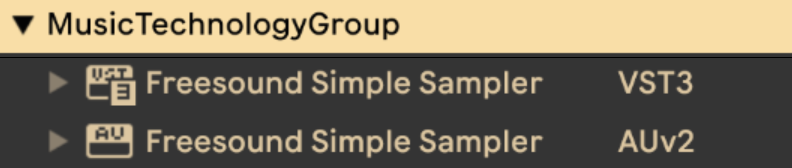
The resulting plugin will be named Freesound Simple Sampler and will be built in the following formats: AudioUnit (AU), VST3, and Standalone Application. In your host (in my case, Ableton Live), it will appear under the company name MusicTechnologyGroup.
Customizing JUCE Version
If you need to use a specific version of JUCE, modify the following section in ./CMake/Findjuce.cmake.
    if (MSVC)
        CPMAddPackage("gh:juce-framework/JUCE#69795dc")     # JUCE#69795dc refers to JUCE commit 69795dc on GitHub
    elseif (APPLE)
        CPMAddPackage("gh:juce-framework/JUCE#develop")
    elseif (UNIX)
        CPMAddPackage("gh:juce-framework/JUCE#69795dc")
    endif ()
The cmake setup is based on Eyal Amir’s Template Available Here repository. I highly recommend checking it out for more details on setting up JUCE projects with CMake. Also, a video tutorial by Eyal is available here.
3. Querying the Freesound API
For this part, refer to ./Plugins/FreesoundSimpleSampler/Source/FreesoundSearchComponent.h
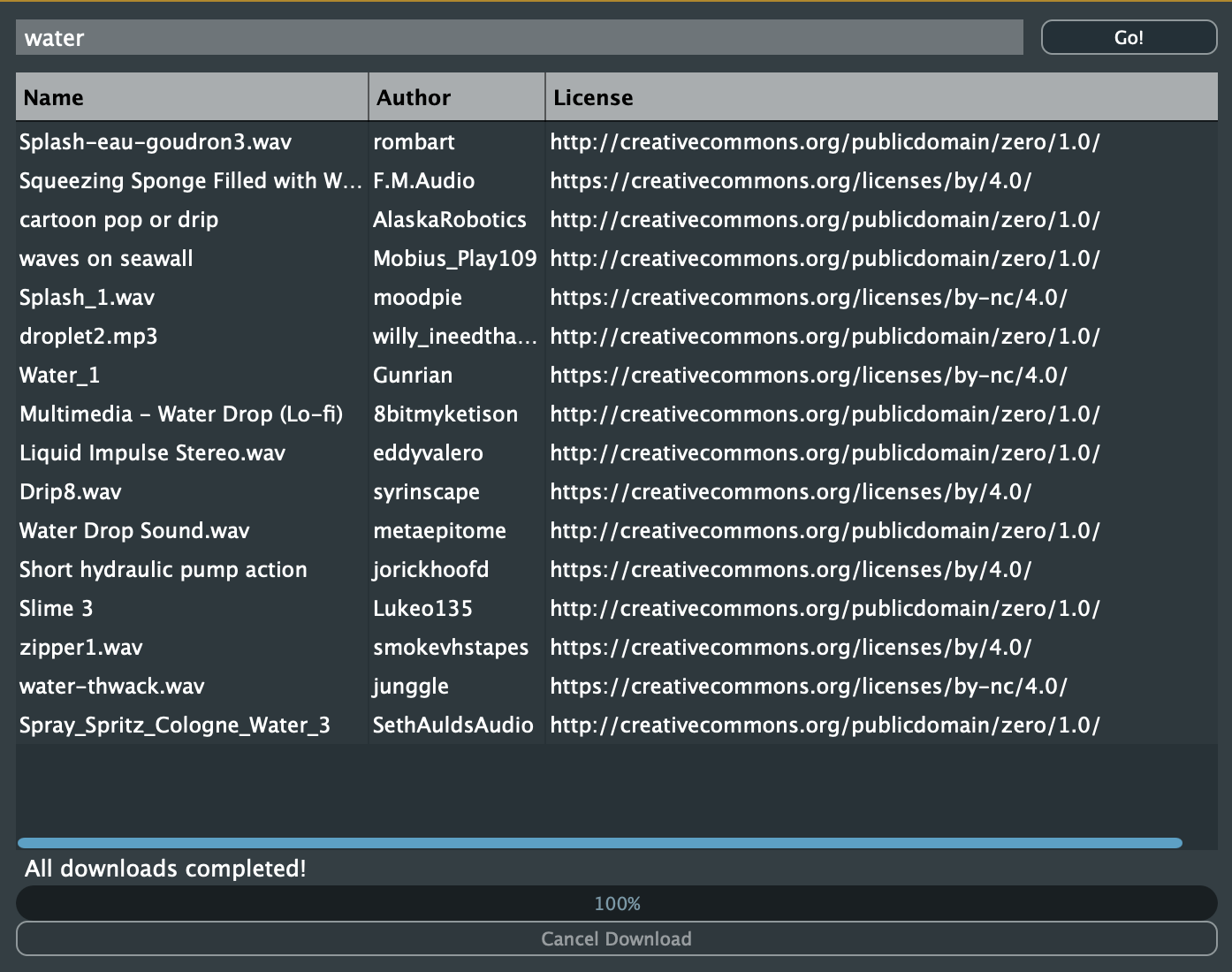
In the plugin, we have a top panel with a TextEditor for entering search queries, a button for initiating the search, and a custom component (ResultsTableComponent) for displaying the search results.
The ButtonListener callback for the search button is implemented as follows:
    void buttonClicked (Button* button) override
        {
            if (button == &searchButton)
            {
                Array<FSSound> sounds = searchSounds();

                if (sounds.size() == 0) {
                    AlertWindow::showMessageBoxAsync(AlertWindow::WarningIcon, "No results",
                    "No sounds found for the query: " + searchInput.getText(true) + ". Possibly no network connection.");
                    return;
                }

        ...
As you can see, when the button is clicked, we call the searchSounds() function to perform the search. If no sounds are found, an alert window is displayed to inform the user about the lack of results, possibly due to no network connection.
The searchSounds() method is the first place where we interact with the Freesound API.
    Array<FSSound> searchSounds ()
        {
            // Makes a query to Freesound to retrieve short sounds using the query text from searchInput label
            // Sorts the results randomly and chooses the first 16 to be automatically assinged to the pads

            String query = searchInput.getText(true);
            FreesoundClient client(FREESOUND_API_KEY);
            SoundList list = client.textSearch(query, "duration:[0 TO 0.5]", "score", 1, -1, 150, "id,name,username,license,previews");
            Array<FSSound> sounds = list.toArrayOfSounds();
            auto num_sounds = sounds.size();

            std::random_device rd;
            std::mt19937 g(rd());
            std::shuffle(sounds.begin(), sounds.end(), g);
            // minimum of 16 sounds, or the number of sounds available
            sounds.resize(std::min(num_sounds, 16));

            // Update results table
            searchResults.clearItems();
            for (int i=0; i<sounds.size(); i++){
                FSSound sound = sounds[i];
                StringArray soundData;
                soundData.add(sound.name);
                soundData.add(sound.user);
                soundData.add(sound.license);
                searchResults.addRowData(soundData);
            }
            searchResults.updateContent();

            return sounds;
        }
FreesoundClient
To search for sounds, we first create an instance of the FreesoundClient class, passing our API key as a parameter. This class is responsible for handling all interactions with the Freesound API.
FreesoundClient client(FREESOUND_API_KEY);
Do not hardcode your API key in production code. After completing the CMake setup, there will be a header file generated in ./Plugins/FreesoundSimpleSampler/Source/FreesoundKeys.h.
Make sure to add this file to your .gitignore to avoid exposing your API key in public repositories.
Performing the Search
Next, we call the textSearch() method of the FreesoundClient instance to perform the search. This method takes several parameters:
SoundList list = client.textSearch(query, "duration:[0 TO 0.5]", "score", 1, -1, 150, "id,name,username,license,previews");
The parameters passed to textSearch() are as follows:
query: The search query entered by the user.filter: A filter to limit the search results. In this case, we are filtering for sounds with a duration between 0 and 0.5 seconds.sort: The sorting method for the results. Here, we are sorting by score.page: The page number of the results to retrieve. We are retrieving the first page.page_size: The number of results per page. We are retrieving up to 150 results.fields: The fields to include in the response. We are requesting theid,name,username,license, andpreviewsfields.
Handling the Results
The textSearch() method returns a SoundList object containing the search results. We then convert this list to an array of FSSound objects using the toArrayOfSounds() method.
This will allow us to easily check the number of results and access individual sound properties.
    Array<FSSound> sounds = list.toArrayOfSounds();
    auto num_sounds = sounds.size();
Randomizing and Populating the Results Table
To add some variability to the results, we shuffle the array of sounds randomly and resize it to a maximum of 16 sounds (or fewer if there are not enough results).
    std::random_device rd;
    std::mt19937 g(rd());
    std::shuffle(sounds.begin(), sounds.end(), g);
    // minimum of 16 sounds, or the number of sounds available
    sounds.resize(std::min(num_sounds, 16));
Finally, we update the ResultsTableComponent with the names, usernames, and licenses of the retrieved sounds.
    // Update results table
    searchResults.clearItems();
    for (int i=0; i<sounds.size(); i++){
        FSSound sound = sounds[i];
        StringArray soundData;
        soundData.add(sound.name);
        soundData.add(sound.user);
        soundData.add(sound.license);
        searchResults.addRowData(soundData);
    }
    searchResults.updateContent();
We are not downloading any sounds here. We have so far only selected the sounds we want to download and play later. The method returns the resulting sounds and we notify the processor to download them asynchronously and prepare the playback samplers.
4. Asynchronous Downloading of Selected Sounds from Freesound
After the execution of the searchSounds() method, the selected sounds are passed to the audio processor via the newSoundsReady() method.
    void buttonClicked (Button* button) override
    {
        if (button == &searchButton)
        {
            Array<FSSound> sounds = searchSounds();

            // ...

            processor->newSoundsReady(sounds, searchInput.getText(true), searchResults.getData());   # <------ Here
        }
    }
Let’s take a look at the newSoundsReady() method in the processor. The newSoundsReady() initiates a chain of callbacks that eventually leads to a background thread downloading the selected sounds (thread implementation in Plugins/FreesoundSimpleSampler/Source/AudioDownloadManager.h).
    void FreesoundSimpleSamplerAudioProcessor::newSoundsReady (Array<FSSound> sounds, String textQuery, std::vector<juce::StringArray> soundInfo)
    {
        // ...

        // Start downloads using the new download manager
        startDownloads(sounds);
    }

    void FreesoundSimpleSamplerAudioProcessor::startDownloads(const Array<FSSound>& sounds)
    {
        // ...

        downloadManager.startDownloads(sounds, tmpDownloadLocation);
    }

    void AudioDownloadManager::startDownloads(const juce::Array<FSSound>& sounds, const juce::File& downloadDirectory)
    {
        // ...

        startThread();

        // ...
    }
The threading in JUCE is such that when you call startThread(), the run() method of the thread class is executed in a separate thread. The actual downloading of sounds happens in the run() method of the AudioDownloadManager class.
    void AudioDownloadManager::run()
    {
        for (int i = 0; i < soundsToDownload.size() && !threadShouldExit(); ++i)    // iterate over sounds to download
        {

            // Create web input stream
            juce::URL downloadUrl = url;
            currentStream = std::make_unique<juce::WebInputStream>(downloadUrl, false);

            if (currentStream->connect(nullptr))
            {
                // Get file size if available
                int64 totalSize = currentStream->getTotalLength();

                // ...

                // Create output stream
                std::unique_ptr<juce::FileOutputStream> output = currentOutputFile.createOutputStream();

                if (output != nullptr)
                {
                    const int bufferSize = 8192;
                    juce::HeapBlock<char> buffer(bufferSize);
                    // ...

                    while (!currentStream->isExhausted() && !threadShouldExit()) // keep downloading and write to the dedicated temporary file
                    {
                        int bytesRead = currentStream->read(buffer, bufferSize);

                        if (bytesRead > 0)
                        {
                            output->write(buffer, bytesRead);

                            // ...
                        }
                        else if (bytesRead == 0)
                        {
                            break; // End of stream
                        }
                        else
                        {
                            allSuccessful = false;
                            break; // Error
                        }
                    }

                    output->flush();
                }

            listeners.call([allSuccessful](Listener& l) { l.downloadCompleted(allSuccessful); });   <--- notify listener (processor) that download is complete
As mentioned above, we can only download previews without user authentication. For this reason, we are using the getOGGPreviewURL() method of the FSSound class to get the URL of the OGG preview of the sound.
In the implementation, we also handle progress updates and error handling, but for brevity, I have omitted those parts here. You can refer to the full implementation in AudioDownloadManager.h and AudioDownloadManager.cpp.
5. Playback of Downloaded Sounds
The sounds are downloaded in a temporary directory, and once the download is complete, the processor will load the sounds into dedicated samplers for playback.
    void FreesoundSimpleSamplerAudioProcessor::downloadCompleted(bool success)
    {
        if (success)
        {
            // Set up the sampler with the downloaded files
            setSources();
        }

        // Forward to editor listeners (so that sounds can be auditioned by clicking on the pads)
        downloadListeners.call([success](DownloadListener& l) {
            l.downloadCompleted(success);
        });
    }
The setSources() method is responsible for loading the downloaded sounds into the samplers.
    void FreesoundSimpleSamplerAudioProcessor::setSources()
    {
        // Clear existing sounds and voices before adding new ones
        sampler.clearSounds();
        sampler.clearVoices();

        int poliphony = 16;
        int maxLength = 10;

        // Add voices
        for (int i = 0; i < poliphony; i++) {
            sampler.addVoice(new SamplerVoice());
        }

        if(audioFormatManager.getNumKnownFormats() == 0){
            audioFormatManager.registerBasicFormats();
        }

        Array<File> files = tmpDownloadLocation.findChildFiles(2, false);
        for (int i = 0; i < files.size(); i++) {
            std::unique_ptr<AudioFormatReader> reader(audioFormatManager.createReaderFor(files[i]));

            if (reader != nullptr) // Add null check for safety
            {
                BigInteger notes;
                notes.setRange(i * 8, i * 8 + 7, true);
                sampler.addSound(new SamplerSound(String(i), *reader, notes, i*8, 0, maxLength, maxLength));
            }
        }
    }
6. Auditioning and MIDI Playback
The plugin allows users to audition sounds by clicking on the pads in the GUI or by playing MIDI notes.
    void FreesoundSimpleSamplerAudioProcessor::processBlock (AudioBuffer<float>& buffer, MidiBuffer& midiMessages)
    {
        midiMessages.addEvents(midiFromEditor, 0, INT_MAX, 0);      <--- Add MIDI events from editor (for auditioning by clicking on pads)
        midiFromEditor.clear();
        sampler.renderNextBlock(buffer, midiMessages, 0, buffer.getNumSamples()); <--- Render audio from sampler based on MIDI events
        midiMessages.clear();
    }